

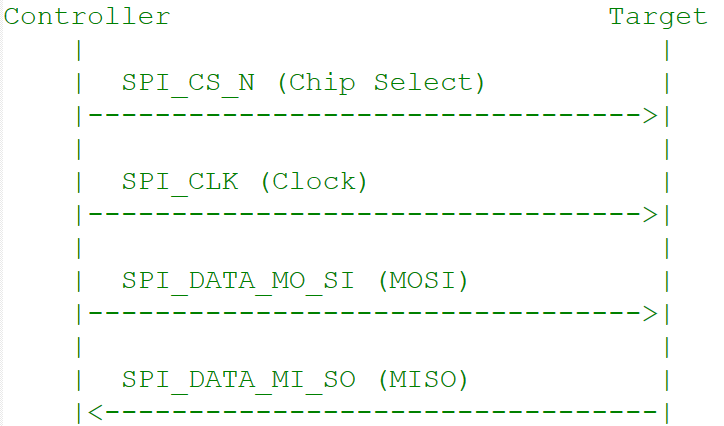
Signals
Transfer Modes by Subsystem
Interface Components
Device Tree Sources
APIs
Software Configuration
Linux Device Tree Example
QUPAC Access Control
Configuration Steps
1
Enable kernel configurations
Edit
kernel_platform/kernel/arch/arm64/configs/qcom_defconfig:2
Enable SPI node in device tree
3
Compile and flash
Compile the kernel and device tree changes, then load images to the device.
Verification
1
Transfer spidev_test to device
2
Run test
Debugging
Enable Debug Logs
Troubleshooting
SPI Device Not Detected (/dev/spidev* missing)
SPI Device Not Detected (/dev/spidev* missing)
- Verify SPI node status is
"okay"in device tree - Verify
QUPAC_Access.csetsQUPV3_PROTOCOL_SPI,AC_HLOS,bLoad=TRUE
SPI Transfer Failures / Data Corruption
SPI Transfer Failures / Data Corruption
- Check GPIO drive strength and pull configuration in pinctrl
- Verify clock phase and polarity match the target device
- Use oscilloscope to check signal integrity
GSI/DMA Mode Not Working
GSI/DMA Mode Not Working
- Verify
CONFIG_QCOM_GPI_DMA=mis enabled - Check
dmasanddma-namesproperties in device tree - Verify
QUPAC_Access.csetsQUPV3_MODE_GSIandbAllowFifo=FALSE
Multiple Chip Select Issues
Multiple Chip Select Issues
Verify all CS pins are configured in pinctrl. Check device tree Test explicitly:
reg property:Boot Subsystem SPI Not Working
Boot Subsystem SPI Not Working
- Verify QUP wrapper node status is
"okay"and serial engine node is"disabled" - Confirm
FIFO_MODE = /bits/ 8 <1>(GSI not supported in boot) - Check
protocol_supportedincludesSPI_SUPPORTED - Verify
QUPAC_Access.csettings match boot requirements