

Key Parameters
- Baud rate — Communication speed (bits per second)
- Start/Stop bits — Frame delimiters
- Parity bit — Optional error checking
- Data bits — 5–9 bits per frame
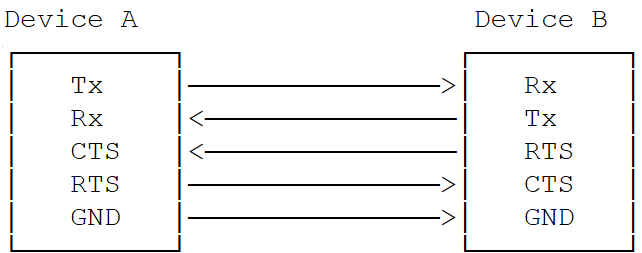
- Flow control — Hardware handshaking via CTS/RTS

Transfer Modes by Subsystem
Interface Components
Device Tree Sources
APIs
Software Configuration
Linux Device Tree Example
4-wire UART (with flow control):Kernel Configuration
Editkernel_platform/kernel/arch/arm64/configs/qcom_defconfig:
Verification
1
Verify UART device registration
2
Configure UART settings
3
Run loopback test
Open two SSH terminals.Terminal 1 (write):Terminal 2 (read):Expected output:
Hello UARTDebugging
Enable Debug Logs
Troubleshooting
UART Device Not Detected (/dev/ttyHS* missing)
UART Device Not Detected (/dev/ttyHS* missing)
- Verify device tree status is
"ok" - Confirm
CONFIG_SERIAL_QCOM_GENI=yin kernel config - Check GPIO pin configurations and QUPAC access control settings
Data Transmission Failures / Garbled Data
Data Transmission Failures / Garbled Data
- Verify baud rate matches on both ends
- Check flow control configuration (CTS/RTS)
- Test with loopback mode first
Permission Denied
Permission Denied
High CPU Usage / Slow Transfer
High CPU Usage / Slow Transfer
- Switch from FIFO to DMA mode for high-speed transfers
- Check interrupt statistics:
cat /proc/interrupts | grep uart - Review power management:
cat /sys/kernel/debug/pm_genpd/pm_genpd_summary
Debugging Checklist
- Kernel config includes
CONFIG_SERIAL_QCOM_GENI=y - Device tree status set to
"ok"for UART node - GPIO pins properly configured and mapped
- QUPAC access control properly configured
- Baud rate matches on both sides
- Flow control settings are consistent
- Device file permissions are correct