

Specifications
Wi-Fi
Bluetooth
Hardware Setup
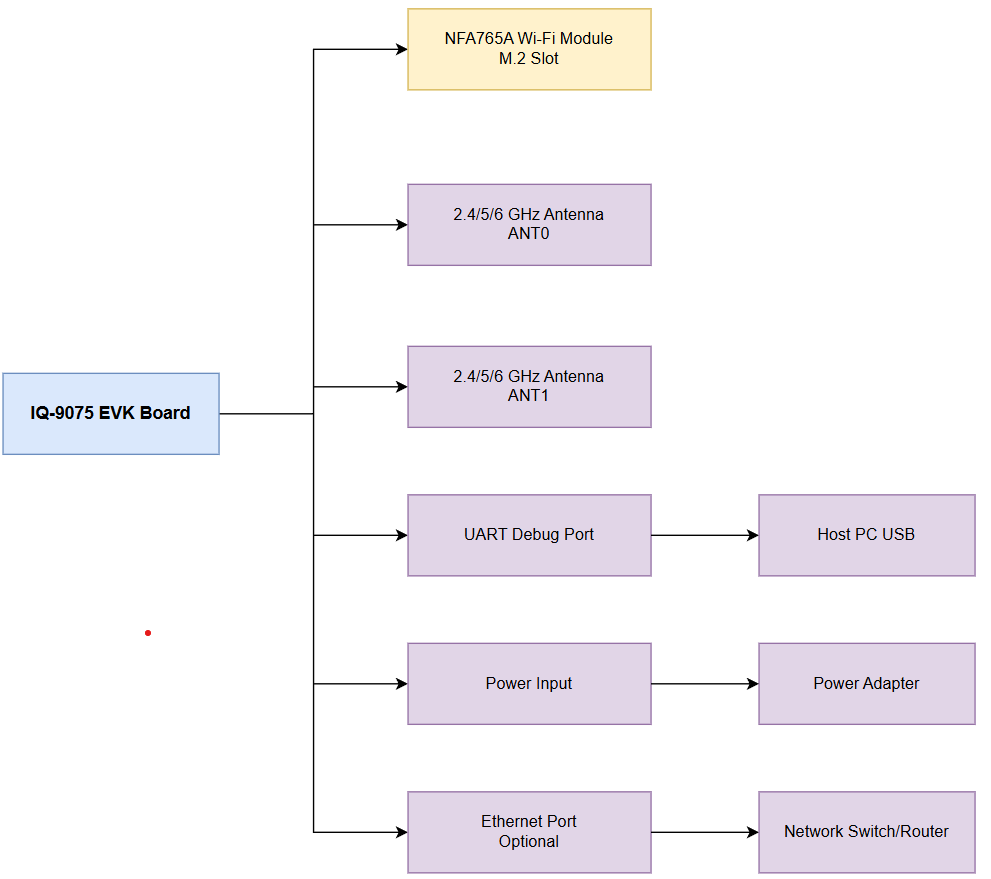
1
Install Wi-Fi Module
Insert the NFA765A module into the M.2 slot at a 30-degree angle, press flat, and secure with the provided screw.
2
Connect Antennas
- ANT0 — supports Wi-Fi 2.4 GHz, 5 GHz, and 6 GHz; shared with Bluetooth when operating at 2.4 GHz
- ANT1 — supports Wi-Fi 2.4 GHz, 5 GHz, and 6 GHz
3
Connect UART Debug Cable
Connect the UART cable to the debug port and note the assigned COM port or
/dev/ttyUSB device.4
Connect Power and Boot
Power on and observe the boot sequence via UART console. Default login:
ubuntu / ubuntu.Architecture
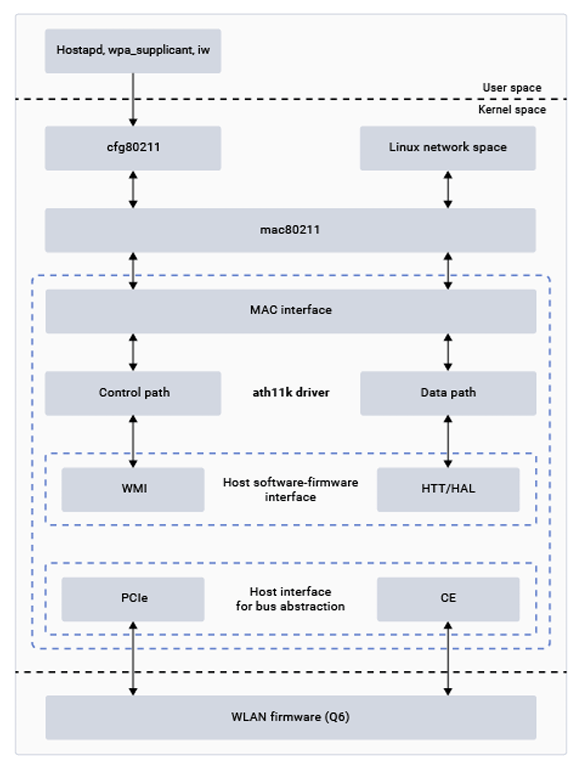
Wi-Fi Software Architecture
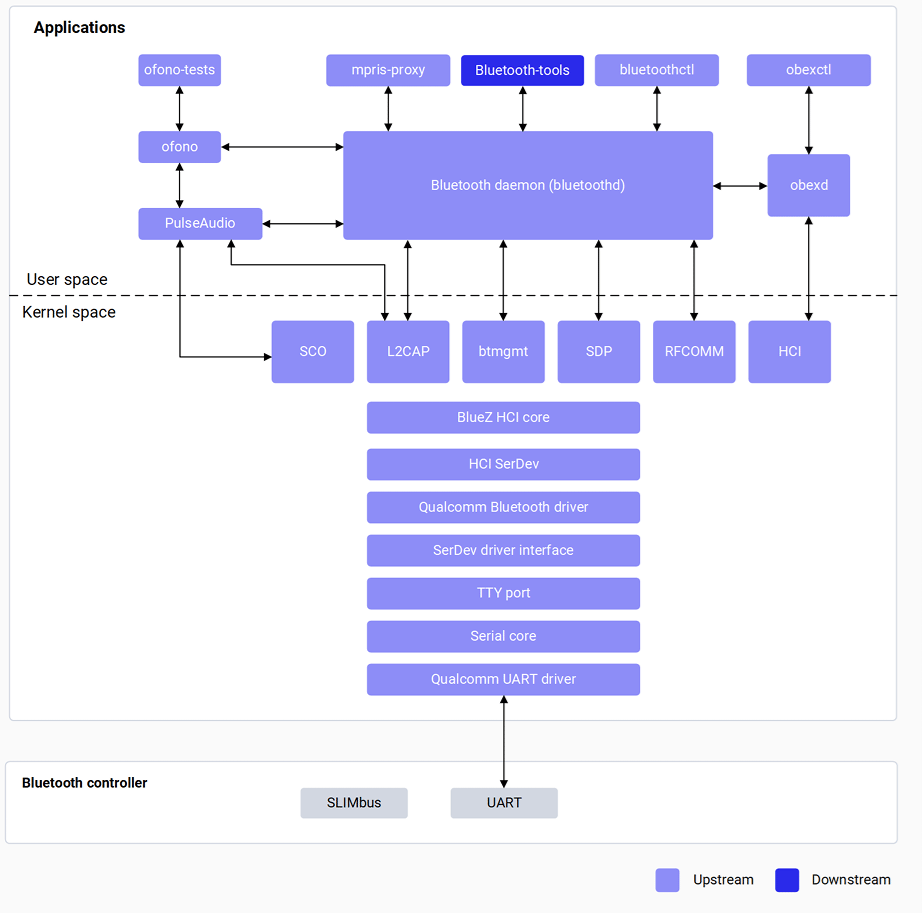
Bluetooth Software Architecture
Verify Components
Wi-Fi
Bluetooth
Wi-Fi Configuration
Station Mode
Set MAC Address (Optional)
Hotspot Mode
1
Add SoftAP interface
2
Configure and start hostapd
3
Start DHCP server
4
Monitor connections
Configure Link Speed
Bluetooth Configuration
Set Bluetooth MAC Address (Optional)
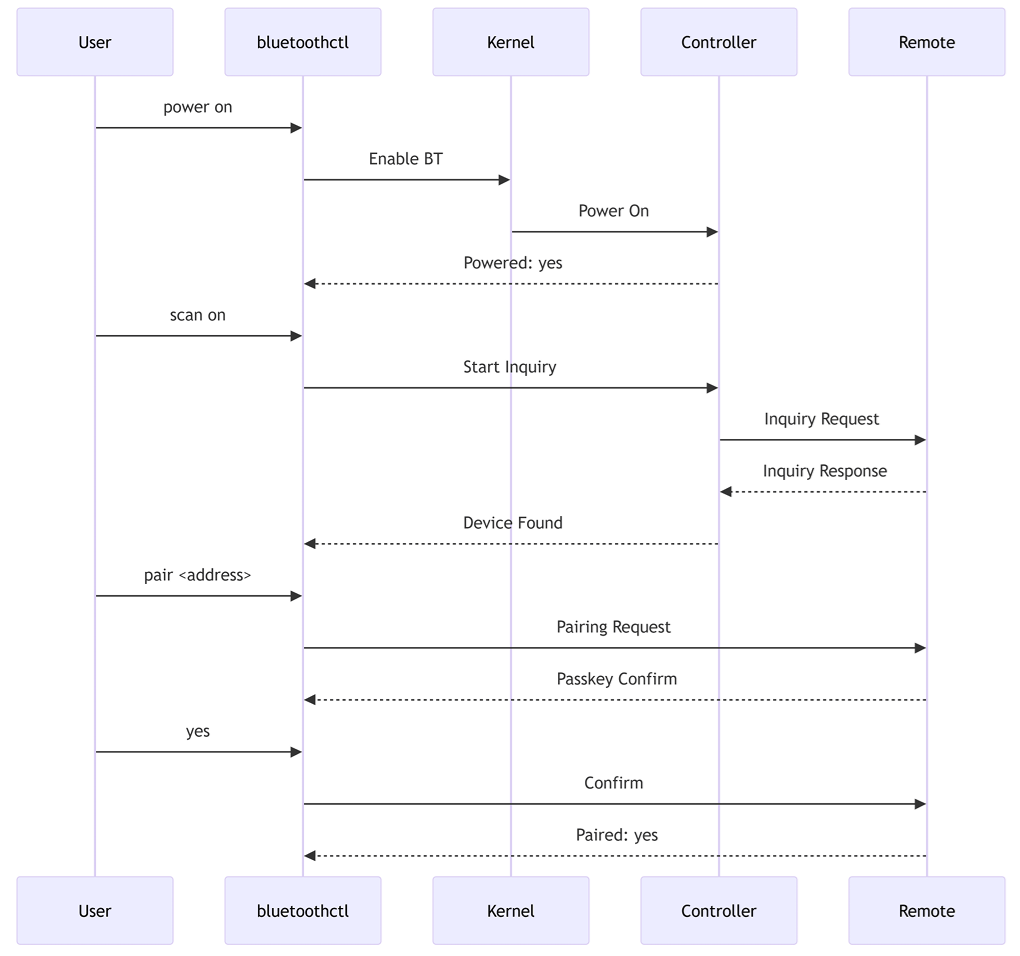
GAP Operations
Supported Bluetooth Profiles
A2DP, AVRCP, and HFP are supported on WCN6750/WCN6856.
Debugging
Wi-Fi Debug Logs
Bluetooth Debug Logs
Troubleshooting
wlp1s0 Interface Not Found
wlp1s0 Interface Not Found
Cause: Driver not loaded or firmware missing.
Cannot Connect to AP
Cannot Connect to AP
Cause: Wrong password or security mismatch.Verify SSID and password; check AP security settings.
No IP Address Assigned
No IP Address Assigned
Cause: DHCP server issue.Check DHCP server on AP; manually assign static IP for testing.
Hotspot Clients Cannot Connect
Hotspot Clients Cannot Connect
Cause: hostapd configuration error.Verify
hostapd.conf settings; check channel and security parameters.Bluetooth Not Powering On
Bluetooth Not Powering On
Cause: Driver not loaded or firmware missing.
Pairing Fails
Pairing Fails
Cause: Passkey mismatch or timeout.Ensure both devices confirm the same passkey; retry pairing.
Audio Profile Not Working
Audio Profile Not Working
Cause: A2DP/HFP not supported on NFA765A.Verify profile support — A2DP and HFP require WCN6750/WCN6856.
Connection Drops
Connection Drops
Cause: 2.4 GHz interference or power management.Disable power management; check for 2.4 GHz interference from Wi-Fi.
Quick Start Checklists
Wi-Fi Station Mode
Wi-Fi Station Mode
- NFA765A module installed in M.2 slot
- Antennas connected (ANT0 and ANT1)
- Firmware files present (
/lib/firmware/ath11k/) -
wlp1s0interface present (iw dev) - Connected to AP (
nmcli dev wifi connect ...) - IP address assigned (
ifconfig wlp1s0) - Internet reachable (
ping 8.8.8.8)
Bluetooth
Bluetooth
- NFA765A chipset initialized
- Bluetooth firmware present (
/lib/firmware/qca/) -
hci0controller present (hciconfig) -
bluetoothdrunning (systemctl status bluetooth) -
bluetoothctlavailable - Bluetooth powered on (
power on) - Scan and pair successful